
Use the Panic Button to notify configured contacts by email, SMS or push when a person activates it through Location Sharing or a compatible, professionally wired vehicle input.
Before you start
The Panic Button is an alerting aid, not a replacement for emergency services. Agree on who will receive and respond to a test before you begin. SMS notifications require available credits. You must use the top-level account, which is the main account with full administrative access, to change contacts. Vehicle activation also requires compatible wiring configured as Panic.
A hardware panic event is transmitted over the mobile network. If the vehicle is outside coverage, the event cannot reach Track My Ride or recipients until the tracker reconnects. Do not rely on it as the only way to request emergency help.
Steps
Configure notification contacts
- Open Settings > Panic Button.
- Review the primary email and SMS contact inherited from the account.
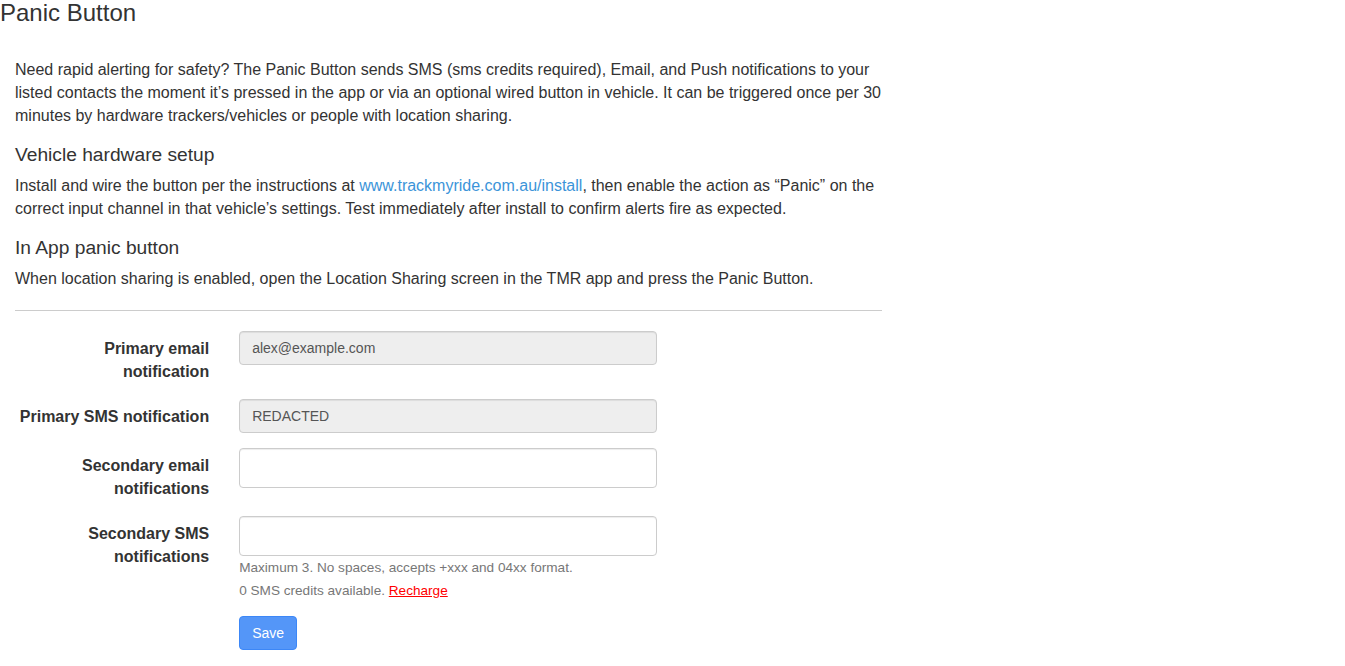
- Confirm that the primary contact details are current.
- Add secondary email and SMS contacts as needed, up to the limit shown on screen.
- Select Save.
Prepare and test activation
- For a vehicle button, have a professional install compatible wiring and set the correct input action to Panic in the vehicle settings.
- Tell all recipients that you are about to run a controlled test so they do not treat it as a real emergency.
- Activate the button once using the agreed test procedure.
- Confirm that each intended contact receives the expected email, SMS or push notification.
- Check Reports > Alert History for the test activation.
What happens next
Future activations send the configured notifications when mobile connectivity and enough SMS credits are available. The sending limit shown on screen also applies. Keep the response procedure and recipient list current, and repeat a controlled test after changing contacts, app permissions or vehicle wiring.
Troubleshooting
- The activation appears in Alert History but a notification is missing: The activation reached Track My Ride. Check the SMS balance, recipient address or phone number format, junk mail and app notification permissions for the missing channel.
- No activation appears in Alert History: Check the Location Sharing Panic Button or professionally installed vehicle input. For hardware, confirm tracker connectivity and that the input action is configured as Panic before testing again.
- Some recipients receive the test and others do not: Compare each missing recipient with the saved contact list and channel limits shown on screen. Correct one contact at a time and run another announced test.
- A sub-account user cannot change contacts: The top-level account manager must update the Panic Button recipients.
- A real activation occurs: Follow the organisation's emergency response procedure. Do not delay contacting emergency services while troubleshooting notification delivery.