
A complete power cycle can help a GPS tracker reconnect when it has stopped communicating with Track My Ride. Unlike briefly turning the vehicle off, this procedure removes external power and waits for the tracker's internal backup battery to become fully depleted before power is restored.
Perform this procedure when Track My Ride Support asks you to. A disconnected tracker cannot report its location, and the process can take overnight or longer depending on the backup battery charge.
Before you start
Park the vehicle safely, switch off the ignition and keep the keys away from the vehicle. Tell anyone who relies on its tracking that it will remain offline during the power cycle.
Identify the tracker before disconnecting it:
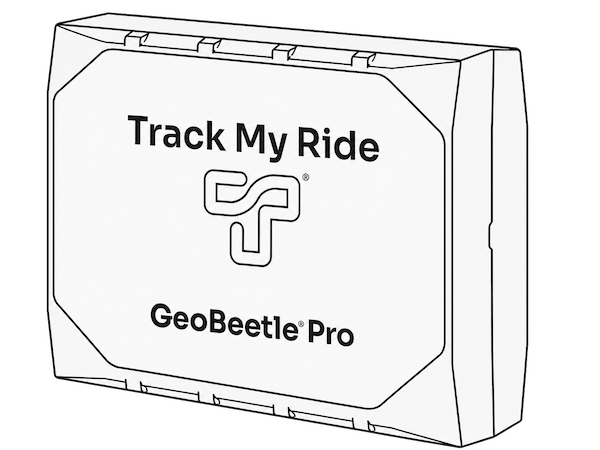
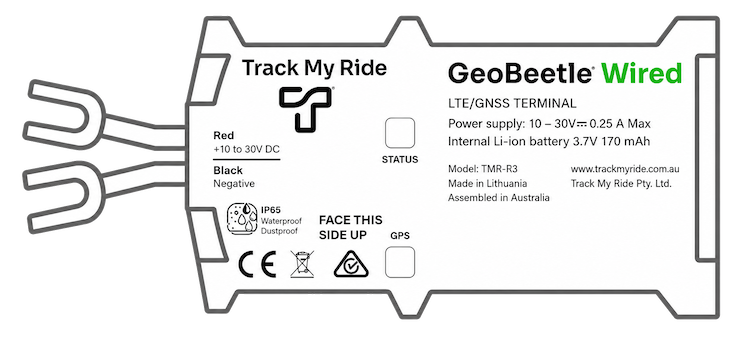
GeoBeetle Wired (TMR-R3)
Disconnect its black GND ring terminal from the vehicle battery's negative terminal. Opening this one connection is enough to stop external power reaching a correctly installed two-wire tracker. Keep the disconnected ring terminal insulated and secured so it cannot touch the battery terminal or other metal. You do not need to disconnect the red positive lead.
GeoBeetle Pro (TMR-S8)
Release and unplug the complete 12-pin power cable or wiring-harness connector from the tracker itself. Do not remove individual wires from the connector. This applies whether the harness receives power through an OBD-II cable or a professional hardwire installation.
Do not pull on wires, cut a cable, open the tracker enclosure or work on live wiring. Vehicle batteries can deliver enough current to cause burns, fire or equipment damage if a tool or positive connection is short-circuited. If the connector is inaccessible, the wiring differs from the descriptions above, or you are not comfortable working around vehicle wiring, ask a qualified auto electrician or installer to complete the procedure.
Steps
- Confirm that the vehicle ignition is off and record the vehicle's last update time in Track My Ride.
- Remove external power using the method in the table for your tracker. Do not rely on switching off the ignition because these trackers are normally connected to constant vehicle power.
- Check that the disconnected cable or terminal cannot contact a power source, vehicle metal, moving part or hot surface.
- Leave the tracker disconnected overnight. Its internal backup battery may keep both green lights operating for several hours.
- In the morning, inspect both tracker lights without reconnecting power.
- If either light is on or flashing, leave the tracker disconnected and check again after a few hours. A light that wakes or flashes when the tracker is moved means the backup battery is not yet fully depleted.
- Do not reconnect external power until both lights remain completely off. Waiting for both lights to stop is what makes this a complete power cycle; the overnight period alone may not be sufficient.
- Reconnect the tracker using the reverse of the method above:
- For a GeoBeetle Wired (TMR-R3), securely refit the black GND ring terminal to the vehicle battery's negative terminal.
- For a GeoBeetle Pro (TMR-S8), align and firmly reconnect the complete 12-pin connector without forcing it.
- Confirm that the tracker lights turn on or begin flashing. Switch the vehicle ignition on and, where practical, move the vehicle outdoors with a clear view of the sky and mobile coverage.
- Tell Track My Ride Support that the tracker has been reconnected. Include the reconnection time so Support can check for a new server connection.
What happens next
Restoring external power starts the tracker from a fully powered-off state. It then attempts to acquire a mobile connection and GPS position. This can take several minutes, particularly when the vehicle is indoors or the tracker has not operated recently.
Refresh Map and compare the vehicle's last update time with the time recorded before the power cycle. A newer update confirms that Track My Ride has received data from the tracker. Keep the vehicle outdoors briefly if the tracker has mobile connectivity but is still acquiring GPS.
Troubleshooting
- A light is still flashing the next morning: Leave the tracker disconnected for several more hours. Do not reconnect it until both lights remain off.
- A light appears off but flashes when the tracker is moved: The tracker may have been sleeping. Leave it disconnected until movement no longer wakes either light.
- You cannot reach or release the connector: Do not pull the cable or dismantle vehicle trim unless you are qualified. Ask a qualified auto electrician or installer for help.
- The tracker has more or different wires: Stop and confirm the tracker model with Support. Do not use the two-wire procedure on a different hardwired device.
- No lights appear after reconnection: Check that the TMR-S8 connector is fully seated or that the TMR-R3 negative ring terminal is secure. Ask an installer to check the fuse, vehicle battery voltage, constant power and ground.
- The lights return but Track My Ride receives no update: Move the vehicle outdoors, allow several minutes for mobile and GPS acquisition, then contact Support with the tracker identifier, disconnection and reconnection times, and observed light patterns.