
Keeping your account information up to date ensures you never miss important notifications about your vehicles and billing. You can update your contact details, address, company name, and add a separate billing email all in one place.
Why Update Your Account Details
Current account information ensures you receive all important communications from Track My Ride, including vehicle alerts, billing notifications, and system updates. If your contact details or address change, updating your account prevents missed messages and ensures invoices reach the correct location.
Updating Your Account Information
Step 1: Sign In
Sign in to your Track My Ride account at https://app.trackmyride.com.au or using the mobile app.
Step 2: Navigate to Settings
Click the settings icon to access your account settings.
Step 3: Open Account Information
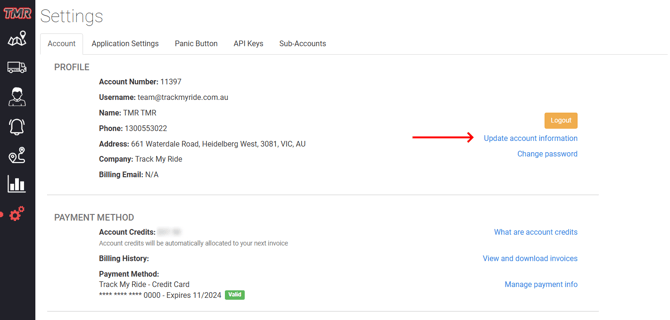
Click the "Update account information" link in the Profile section.
Step 4: Update Your Details
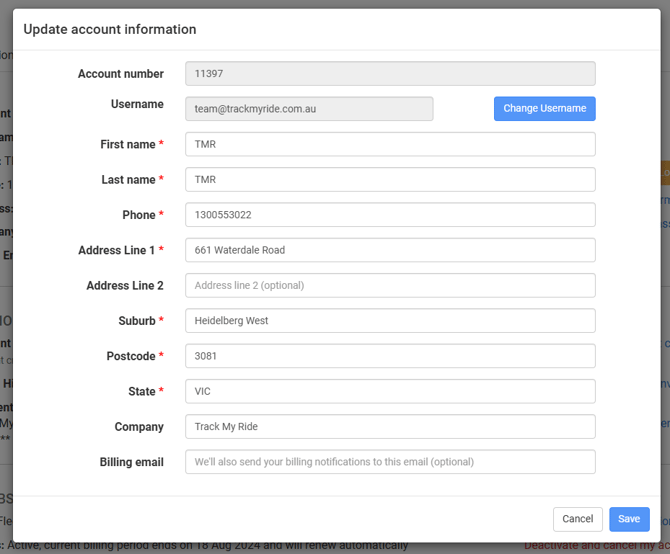
Step 5: Save Changes
After updating your information, click the "Save" button. Click "Cancel" if you don't want to save your changes.