
The following devices operate on the 3G network and ceased to operate when the 3G network was shut down on 28 October 2024. You can upgrade to either the TMR-S8 or TMR-S8W which both support the 4G network.
The way this upgrade is completed differs for each legacy device model. Pay careful attention to the instructions below. Most importantly, for a TMR-S5 and TMR-S7e, the wiring needs to be replaced as the pin layout differs from the TMR-S8 even though both models use the same 12 pin header.
Legacy Device Models
TMR-S7
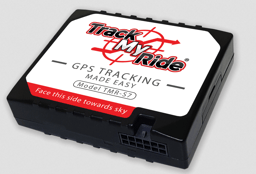
Communication ID like Fxxx or Fxxxxx (e.g. F12345)
Internal GPS and Mobile antennas
12 pin power and IO cable: Red (+), Black (-), Yellow (Acc). Pinout on label
Upgrade type: Simple device swap
The wiring scheme for the TMR-S7 is the same as the TMR-S8. You can simply unplug the original unit and plug in the new unit.
TMR-S5 and TMR-S7e
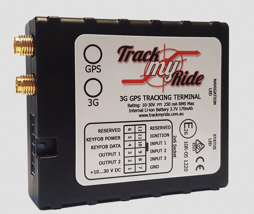
Communication ID like Exxx (e.g. E999)
GPS and Mobile antennas
12 pin power and IO cable: Red (+), Black (-), Yellow (Acc). Pinout on label
Upgrade type: Re-wire required
The 12 pin header is the same shape, but the position of some wires has changed between the TMR-S5/S7e and the TMR-S8. The position of the (+) and (-) pins are the same, but the other IO wires including the Yellow ACC wire are in a different position. If you connected the yellow ACC wire or any other IO wires originally, they will need to be relocated according to the TMR-S8's new pinout. The minimum wires to connect to the TMR-S8 are power (+) and (-). If the yellow Acc wire is not connected, engine on/off is determined by voltage 13.2V or higher.
TMR-S1

Communication ID like Dxxx (e.g. D888)
GPS and Mobile antennas
Inline fused 4 pin, 3 wire power cable: Red (+), Black (-), Yellow (Acc)
Upgrade type: Re-wire required
For hard-wiring, you can cut off the original 4 pin header used by the TMR-S1 and connect the wires to the new 12 pin wiring harness. The minimum wires to connect to the TMR-S8 are power (+) and (-). If the yellow Acc wire is not connected, engine on/off is determined by voltage 13.2V or higher.
General Upgrade Steps
Step 1: Find Which Vehicle the Tracker Has Been Assigned To
If you have multiple vehicles to be upgraded, new trackers may have been pre-assigned to a vehicle by the fleet manager or Track My Ride account holder. If not, or not specified, take time to note down the new tracker's communication ID and the registration of the vehicle it's going into. You'll need these values to upgrade the tracker later from the upgrade page at https://app.trackmyride.com.au/v2/upgrade/. If you're unsure, ask the fleet manager or Track My Ride account holder.
Step 2: Locate the Old TMR Device
Track My Ride GPS trackers are generally fitted to the underside of the vehicle's dashboard. If you are struggling to locate the device, trace any aftermarket wiring connections from the vehicle's battery or fuse box.
Step 3: Determine the Model of the Original TMR Device
TMR-S5 and TMR-S7e: GPS and Mobile antennas and cables, 12 pin wire loom
TMR-S7: No GPS or Mobile antenna cables, 12 pin wire loom OR OBD II Plug and Play cable
TMR-S1: GPS and Mobile antennas and cables, A large 4 pin, 3 wire power supply cable
Step 4: Follow the Device Specific Upgrade Procedure
See the device specific instructions below based on your model.
Upgrading a TMR-S5 or TMR-S7e
This device has the same 12 pin connector but a different pin layout and will need to have the wiring changed. Failing to modify the wiring can result in damage to the new TMR-S8 unit, causing it to malfunction or become inoperable.
If ONLY the (+) and (-) wires have been connected on the original tracker's harness, you can use the original wiring as the position of the (+) and (-) wires is the same between the two models. If the yellow ACC wire or any other IO wires were also connected to the original unit, they need to be rewired as the pinout is different between the two models.
Always disconnect your vehicle's negative battery terminal before you undertake wiring work.
Procedure:
Unplug and remove the TMR-S5 or TMR-S7e GPS unit.
Remove the Mobile and GPS antennas.
Install the TMR-S8 using the OBD II cable or wiring loom provided, being sure to check your wiring pinouts between the two models have been connected correctly. Please check your wiring before plugging in your new TMR-S8.
Check that the two green LED lights on the TMR-S8 illuminate (after a few seconds). The navigation light will flash when a GPS signal has been acquired.
Complete the device swap and activation on the upgrade page at https://app.trackmyride.com.au/v2/upgrade/. You will need access to your Track My Ride account to do this.
Your new tracker will be activated on the mobile network 5 to 60 minutes after completion of the swap process. Your original tracker will be deactivated at the same time the new tracker is activated.
Take the vehicle for a test drive to confirm it's operating correctly and tracks are recorded in your account.
Upgrading a TMR-S1
Always disconnect your vehicle's negative battery terminal before you undertake wiring work.
Procedure:
Unplug and remove the TMR-S1 unit.
Remove the Mobile and GPS antennas.
Install the TMR-S8 using the OBD II cable or wiring loom provided, being sure to check your wiring pinouts between the two models have been connected correctly. Please check your wiring before plugging in your new TMR-S8.
Check that the two green LED lights on the TMR-S8 illuminate (after a few seconds). The navigation light will flash when a GPS signal has been acquired.
Complete the device swap and activation on the upgrade page at https://app.trackmyride.com.au/v2/upgrade/. You will need access to your Track My Ride account to do this.
Your new tracker will be activated on the mobile network 5 to 60 minutes after completion of the swap process. Your original tracker will be deactivated at the same time the new tracker is activated.
Take the vehicle for a test drive to confirm it's operating correctly and tracks are recorded in your account.
Upgrading a TMR-S7
This device uses the same cable and pinout as the new TMR-S8.
Procedure:
Unplug and remove the TMR-S7 unit.
Install the TMR-S8 using the existing wiring you're already using.
Check that the two green LED lights on the TMR-S8 illuminate (after a few seconds). The navigation light will flash when a GPS signal has been acquired.
Complete the device swap and activation on the upgrade page at https://app.trackmyride.com.au/v2/upgrade/. You will need access to your Track My Ride account to do this.
Your new tracker will be activated on the mobile network 5 to 60 minutes after completion of the swap process. Your original tracker will be deactivated at the same time the new tracker is activated.
Take the vehicle for a test drive to confirm it's operating correctly and tracks are recorded in your account.
For further information on device installation, see the TMR-S8 install page. For any other questions, contact support@trackmyride.com.au.